# Request Field Reference
Review the complete JSON in the [Receipts API](/receipts-api.html) reference for complete information. This
section only focuses on areas that require special attention. For the overall integration flow,
see the [Receipts API Integration Guide](/receipts/receipts-integration-guide.html); for how these fields map to
sections of a rendered receipt, see [Receipt Data Elements](/receipts/receipt-data-elements.html).
## In This Guide
* [Receipts API Integration Guide](/receipts/receipts-integration-guide.html) — authentication, request/response
flow, error handling, and best practices.
* **Request Field Reference** — field-by-field usage notes for headers, discounts, loyalty, tenders, taxes, items,
custom fields, and more.
* [Receipt Data Elements](/receipts/receipt-data-elements.html) — how request fields map to sections of a rendered
receipt (orders, returns, totals, deposits, payment history, and more).
* [Point of Sale UI Guidelines](/receipts/pos-ui-guidelines.html) — recommended configuration options and UI flow.
* [Printed Offers](/receipts/printed-offers.html) — for merchants whose package includes printed offers.
* [SMS Receipts](/receipts/sms-receipts.html) — for merchants whose package includes SMS delivery.
* [Integration Testing Checklist](/receipts/testing-checklist.html) — validate your integration before launch.
## Customer Information
Customer Information is required to uniquely identify the customer and associate them to the transaction. Send
all types of Customer Information available, as they can be used to uniquely identify the customer.
### 1) Email Address
If a customer requests a digital receipt sent to one's email ('Digital Only' or 'Digital and Paper'), an email
address must be sent.
| SAMPLE | NOTES |
"emailAddress": "jane.doe@email.com",
|
Digital receipt transactions ('Digital Only' & 'Digital and Paper') REQUIRE an email address. 'Paper Only' receipt transactions can set the "emailAddress" element to null if no email address is on file. |
### 2) Phone Number
If the customer record has a phone number, it should be sent.
| SAMPLE | NOTES |
"telephone": {
"areaCode": "000",
"localNumber": "0000000"
}
|
US phone numbers should use both areaCode and localNumber and send only numeric values. |
**NOTE:** If your flexEngage package includes SMS support, the content format is different. Refer to
[SMS Receipts](/receipts/sms-receipts.html) for details on how to send an SMS number.
## Receipt Information
The JSON contains information about the receipt and transaction. Send as much of this information as possible.
See the [Receipts API](/receipts-api.html) reference for details about the elements that should be sent.
### Mode
The `mode` field flags the environment or purpose of a transaction:
* `Production` — a live, real transaction.
* `Test` — a test transaction, sent while validating your integration.
* `Training` — a demo/training transaction, for use in staff training scenarios.
Coordinate with your flexEngage representative on how each mode is handled on their end (for example, whether
`Test`/`Training` transactions are excluded from merchant analytics and reporting).
### Header
flexEngage has a **"header"** element in the JSON that allows multi-line text at the top of the receipt in a
location determined by the receipt template. This is typically used for dynamic text that needs to appear for
special cases, such as employee purchase information or "Customer Receipt Copy". **"header"** supports "\n" for a
line break and "\t" for a tab.
| EXAMPLE | WOULD DISPLAY AS |
"header": "Customer Receipt Copy\nEmployee Discount",
|
Customer Receipt Copy Employee Discount |
### Receipt Footer (Dynamic)
flexEngage provides **additionalInfo1**, **additionalInfo2**, **additionalInfo3**, **additionalInfo4** and
**additionalInfo5** multi-line elements for display at locations determined by the receipt template. This can be
dynamic text sent by the POS (e.g., \*\*\*You Saved $10.00\*\*\*)
| EXAMPLE | WOULD DISPLAY AS |
"additionalInfo1": "We Appreciate Your Business!",
"additionalInfo2": "*** You Saved $10.00 ***",
"additionalInfo3": null,
|
We Appreciate Your Business! *** You Saved $10.00 *** |
### Multiple Transaction Discounts
flexEngage supports multiple transaction level discounts (promos) per receipt and allows for custom labels for
each discount (e.g., "AARP Discount")
| EXAMPLE | WOULD DISPLAY AS |
"discounts": [
{
"amount": 10.0,
"name": "10% Discount"
},
{
"amount": 15.0,
"name": "AARP Discount"
}
],
|
10% Discount (10.00) AARP Discount (15.00) |
### Loyalty Information
If a loyalty number is associated with the customer, send as much loyalty information as is available. flexEngage
collects the following loyalty information:
| SAMPLE | NOTES |
"loyalty": {
"number": "1234",
"customerName": "Jim Smith",
"expirationDateTime": "2014-01-01",
"balance": 1.0,
"misc": "Points Earned Today: 20"
},
|
- Loyalty Number
- Loyalty Customer's Name
- Loyalty Expiration Date
- Loyalty Point Balance
- Misc. Loyalty information
|
### Credit Card Information
For credit/debit transactions, send as much info as possible:
| SAMPLE | NOTES |
"tenders": [
{
"tenderTypeCode": "CreditDebit",
"dateTime": "2017-01-12T00:00:00+05:00",
"amount": 5397.87,
"creditDebit": {
"first6Digits": "000000",
"last4Digits": "0000",
"typeCode": "Visa",
"name": {
"firstName": "Jane",
"lastName": "Customer"
},
"expirationDate": "0101"
},
"authorizationCode": "123335",
"miscInfo": null,
"emv": {
"aid": "123S805290823G09532A09",
"appLabel": "VISA",
"appPreferredName": "Chase Visa"
},
"currency": "USD"
}
],
|
- First 6 and Last 4 digits of the credit/debit card.
- tenderTypeCode (e.g.
CreditDebit) and typeCode (the card brand, e.g. Visa) are free-text fields — see the Receipts API reference for field examples.
- First Name and Last Name should be sent from the card's track data.
- Expiration date should be sent in the format YYMM.
|
### Signature Images
flexEngage supports sending a BASE64BINARY image to be displayed on receipts. The signature areas that are
available are:
| EXAMPLE | NOTES |
"signature": {
"base64Image": "...base64binary...",
"imageMimeType": "image/png",
"dateTime": "2011-06-23",
"text": "I agree to pay…."
},
|
Signatures are available for: Tenders, Terms, and Transaction Signature.
- base64Image should contain the base64binary code for the image file.
- signature can contain multi-line terms that are being signed.
|
### Supporting Documents (Links)
flexEngage supports adding dynamic links in various places of the receipt data. Multiple links are available for
any section that supports Supporting Documents.
| EXAMPLE | NOTES |
"items": [
{
"name": "Whirlpool® 5.3 Cu. Ft. Cabrio® High Efficiency Top Load Washer and 8.8 Cu. Ft. Electric Dryer",
"description": null,
"classCode": null,
"sku": "20170112029",
"upc": "20170112029",
"price": 164.64,
"total": 164.64,
"priceNotation": "T",
"quantity": {
"value": 1,
"units": 1,
"unitOfMeasureCode": "Each"
},
"miscInfo": "Total Monthly Payment: $164.64\nNumber of payments: 33\nTotal Price: $5,432.57",
"supportingDocuments": {
"Review 1": {"name": "Write a review", "url": "https://www.rentacenter.com/appliances/washers-and-dryers/whirlpool-5-3-cu-ft-cabrio-high-efficiency-top-load-washer-and-8-8-cu-ft-electric-dryer-–-chromeshadow-wtl850dcpair/p/100018878"},
"Financing 1": {"name": "Click here for Rental Agreement", "url": "https://www.rentacenter.com/how-rac-works/s/how-rent-a-center-works"},
"Warrenty 1": {"name": "Click for Worry-Free Warranty Information", "url": "https://www.rentacenter.com/how-rac-works/rent-a-center-worry-free-guarantee"}
}
}
],
|
- Supporting Documents are available for: items, tenders, terms, and at a receipt level (bottom of receipt).
- supportingDocuments are optional and can be omitted if not required.
- There can be multiple supportingDocuments in any section.
|

### Terms with Signatures (and without) and Links
flexEngage supports multiple multi-line text blocks for various types of terms and conditions. The terms can be
sent with or without a BASE64BINARY signature image and date to be displayed on receipts. A link can be added as
well.
| EXAMPLE | NOTES |
"terms": [
{
"signature": {
"base64Image": "...base64binary...",
"imageMimeType": "image/png",
"dateTime": "2017-01-06",
"text": "I have read and accept the terms and conditions of my lease(s) and purchase."
},
"description": "I acknowledge that I am entering into a lease agreement of 24 months with Aaron's and agree to the monthly payments and interest described in the Terms and Conditions at the link below. I am required to make monthly payments on time and agree to a late penalty and/or possible repossession of merchandise by Aaron's in the event that I fail to pay.",
"supportingDocuments": {
"term1": {"name": "Click for Terms & Conditions", "url": "https://www.yourstore.com/t-terms.aspx"}
}
}
],
|
- Terms can contain an optional signature and date.
- text can be used for terms being signed if a signature is required.
- description can be used for terms if no signature is required.
- signature is optional and can be omitted if a signature is not required.
- supportingDocuments is optional and can be omitted if not required. There can be multiple supportingDocuments.
|

### Multiple Tender Types
flexEngage supports multiple tender types per receipt (i.e., Cash, Visa, Check). Each tender type now has the
following structure:
| SAMPLE | NOTES |
"tenders": [
{
"tenderTypeCode": "Cash",
"dateTime": null,
"amount": 1800,
"creditDebit": null,
"miscInfo": null,
"currency": "USD"
},
{
"tenderTypeCode": "GiftCard",
"dateTime": null,
"amount": 250,
"giftCard": {
"accountNumber": "*********3222",
"balance": 0,
"authNumber": "1234556"
},
"miscInfo": null,
"emv": null,
"currency": "USD"
},
{
"tenderTypeCode": "CreditDebit",
"dateTime": "2014-01-01T00:00:00+05:00",
"amount": 100,
"creditDebit": {
"first6Digits": null,
"last4Digits": "6332",
"typeCode": "VISA"
},
"authorizationCode": "98765",
"miscInfo": null,
"emv": {
"aid": "A0000000031010",
"appLabel": "VISA DEBIT",
"appPreferredName": null,
"additionalAttributes": {
"CARD ENTRY MODE": "Chip Read",
"EMV TAG 5F2A": "0840",
"EMV TAG 8A": "00",
"EMV TAG 95": "0000008000",
"EMV TAG 9B": "E800",
"EMV TAG 9F10": "06O10A03600000",
"EMV TAG 9F34": "1E0300",
"EMV MODE": "ISSUER",
"EMV CVM": "SIGNATURE",
"EMV CHIP INDICATOR": "CONTACT"
}
},
"currency": "USD"
}
],
|
See the Receipts API reference for complete information on tender types. The JSON on the left shows a transaction that was tendered with cash, a gift card, and a credit card. |
### Multiple Taxes
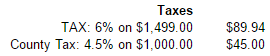
flexEngage supports multiple taxes (e.g., Local, VAT) per receipt. Each tax has the following structure:
| EXAMPLE | WOULD DISPLAY AS / NOTES |
"taxes": [
{
"description": null,
"percent": 0.06,
"taxableAmount": 1499,
"amount": 89.94,
"taxTypeCode": "Sales"
},
{
"description": "County Tax",
"percent": 0.045,
"taxableAmount": 1000,
"amount": 45,
"taxTypeCode": "Sales"
}
],
|
 Not sending description (or setting to null) results in the word "Tax:" being printed on the digital receipt. |
### Multiple Fees
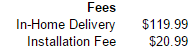
flexEngage supports multiple fees per receipt. It has the following structure:
| EXAMPLE | WOULD DISPLAY AS / NOTES |
"fees": [
{
"amount": 119.99,
"description": "In-Home Delivery"
},
{
"amount": 20.99,
"description": "Installation Fee"
}
],
|
 amount is required for the fee to display on receipt. |
## Item Information
Send as much of this information as possible for each item on the receipt. Limiting information only to what is
displayed on the paper receipt limits the type of data that can be used by head office reporting. See the
[Receipts API](/receipts-api.html) reference for details about the elements to be sent.
### ItemPrice and ItemTotal
Use **price** for the Unit Price if it is available. Use **total** for the Total Amount the customer is paying for
the quantity purchased.
| SAMPLE | NOTES |
"items": [
{
……,
"price": 5.0,
"total": 9.0,
"priceNotation": "N",
"quantity": {
"value": 2,
"units": 2,
"unitOfMeasureCode": "EACH"
},
"discounts": [
{
"amount": -1.0,
"name": "Coupon"
}
]
…...
}
]
|
Note: flexEngage DOES NOT calculate totals or amounts. Calculations need to happen before sending the value to flexEngage through the payload.
- price is for the Unit Price, including Discounts. Do not send an empty element.
- total is the Total Amount the customer paid for the Item, including quantity and discounts. Do not send an empty element: ItemTotal = (Unit Price * Quantity) - Discount.
In the example JSON, there are 2 items, $5 each and a $1 off coupon. The total for the item would be $9.
|
### Non-taxable and Other Price Notations
Use the **priceNotation** element for any codes added to the final price on the printed receipt (e.g., "N" for
non-taxable).
| EXAMPLE | WOULD DISPLAY AS |
"items": [
{
"name": "Candy",
"sku": "0002",
…..,
"price": 2.0,
"total": 2.0,
"priceNotation": "N",
"quantity": {
"value": 1,
"units": 1,
"unitOfMeasureCode": "EACH"
}
}
],
|
NOTE: The exact display will depend upon your receipt template and based upon your requirements.
Item SKU Qty Total
Candy 0002 1 $2.00(N)
|
### Multiple Item Discounts
flexEngage supports multiple item level discounts per receipt and allows for custom labels for each discount
(e.g., "Member Discount")
| EXAMPLE | WOULD DISPLAY AS |
"discounts": [
{
"amount": -1.0,
"name": "Coupon"
},
{
"amount": -2.0,
"name": "Member Discount"
}
],
|
Coupon (1.00) Member Discount (2.00) |
### Multi-line elements (line breaks)
Several elements in the flexEngage JSON support multi-line text with line breaks and tabs using a '\n' newline
symbol and '\t' tab symbol:
| EXAMPLE | WOULD DISPLAY AS |
"additionalInfo1": "Thanks for shopping!\nHave A Great Day\tBye",
|
Thanks for Shopping! Have A Great Day Bye |
#### Elements that support '\n' and '\t'
| header | signature.text | additionalInfo2 |
| items.description | deliveryPickup.instructions | additionalInfo3 |
| miscInfo / miscText | terms.description | additionalInfo4 |
| loyalty.misc | additionalInfo1 | additionalInfo5 |
## Field Validation Notes
A few fields have validation constraints worth checking client-side before submitting a request:
* `transactionNumber` — 1 to 50 characters; alphanumeric plus hyphens and underscores.
* `emailAddress` — must be RFC 5322 compliant.
* `receiptDateTime` — ISO 8601 format, with timezone.
## Custom Fields
flexEngage supports the use of custom fields at the root level of the JSON object and also on any item objects.
The name of a custom field should be alphanumeric (i.e. no special characters, spaces, etc). The value of a custom
field can be an integer, decimal, boolean, string, list, or object.
**NOTE:** When adding custom fields to the payload that need to appear on the receipt, you must let the flexEngage
representative know so the representative can coordinate with the appropriate flexEngage teams to ensure the
fields are added on the receipt.
Below is an example of a payload with custom properties in bold. The names are illustrative of the type of value
but this is not necessary (Note: you should name the fields based on their business purpose).
{
"customer":{
"emailAddress":"customer@example.com"
},
"aCustomString":"this is a custom string",
"aCustomNumber":1,
"aCustomDecimal":1.1,
"aCustomBoolean":true,
"aCustomList":["a", "b","c","d"],
"aCustomObject":{
"prop1":"Custom prop within a custom object",
"prop2":"Custom prop within a custom object"
},
"workstation":{
"id":"ID",
"store":{
"id":"storeId",
"name":"storeName",
"address":{
"addressLine1":"StoreAddressLine1",
"city":"StoreCity",
"territory":"StoreTerritory",
"postalCode":"00000",
"country":{
"value":"StoreCountry",
"code":"US"
}
}
}
},
"receiptType":"DigitalAndPaper",
"receiptDateTime":"2013-11-10T15:15:17-05:00",
"transactionType":"SaleTransaction",
"transactionNumber":"001",
"items":[
{
"name":"ItemName",
"sku":"SKUNumber",
"upc":"UPCNumber",
"price":1.0,
"total":1.0,
"quantity":{
"value":1
},
"aCustomString":"this is a custom string",
"aCustomNumber":1,
"aCustomDecimal":1.1,
"aCustomBoolean":true,
"aCustomList":["a", "b","c","d"],
"aCustomObject":{
"prop1":"Custom prop within a custom object",
"prop2":"Custom prop within a custom object"
}
}
],
"grandAmount":0.0,
"tenders":[
{
"tenderTypeCode":"Cash",
"amount":0.0
}
]
}