This section is relevant to you if your flexEngage receipt services package includes support for sending receipts via SMS.
The flexEngage team performs the following tasks in order for the merchant to be able to use SMS:
You would continue to call the Receipts API as you would for the other receipts. In order to send an SMS receipt request, you will need to make the following changes to the values in the payload:
customer.emailAddress). Including an email
address in the request will cause the receipt to be delivered by email AND sms.
customer.telephone.areaCode). You can either send a
blank or null value, or you can remove the field from the payload.customer.telephone.localNumber) in the following format: a
plus sign, the country code and the area code. Do not include dashes. A few example formats:
receiptType).Below is an example payload for sending an SMS transaction. The affected fields are in bold. For a full explanation of the payload fields and the valid values, reference the Receipts API:
{
  "customer": {
    "emailAddress": "",
    "telephone": {
      "areaCode": "",
      "localNumber": "+12121234567"
    }
  },
  "referenceId": null,
  "workstation": {
    "id": "889",
    "operator": "Joe",
    "associate": "Carl",
    "store": {
      "id": "99999",
      "name": "Jennifer Test Store",
      "address": {
        "typeCode": null,
        "addressLine1": "Alex Test",
        "city": "flexReceipts Headquarters",
        "territory": "FL",
        "postalCode": " 32701",
        "country": {
          "value": "US",
          "code": "US"
        },
        "postalCodeExtension": "1234"
      },
      "telephone": {
        "areaCode": "407",
        "localNumber": "5551212"
      }
    }
  },
  "mode": null,
  "header": null,
  "receiptType": "DigitalOnly",
  "barcodeType": "Code128",
  "barcodeNumber": null,
  "receiptDateTime": "2020-01-21T04:47:10-05:00",
  "loyalty": {
    "number": "23145",
    "customerName": "Joe Customer",
    "expirationDateTime": "2017-12-31",
    "balance": 45,
    "misc": "5 point until next offer"
  },
  "transactionType": "SaleTransaction",
  "relatedTransactionReference": null,
  "transactionNumber": "001",
  "items": [

    ],
    "netAmount": 0,
    "grossAmount": 0,
    "taxes": [
        {
            "description": "Sales Tax",
            "percent": 0.065,
            "taxableAmount": 0,
            "amount": 0,
            "taxTypeCode": "Sales"
        }
    ],
    "grandAmount": 0,
    "tenderApplied": 0,
    "changeDue": 0,
    "tenders": [
        {
            "tenderTypeCode": "Cash",
            "dateTime": null,
            "amount": 0,
            "creditDebit": null,
            "miscInfo": null,
            "currency": "USD"
        }
    ],
  "soldTo": {
    "address": {
      "typeCode": null,
      "addressLine1": "500 Main Street",
      "city": "Orlando",
      "territory": "FL",
      "postalCode": "32805",
      "country": {
        "value": "US",
        "code": "US"
      },
      "postalCodeExtension": null
    },
    "customerName": "Joe Customer",
    "customerNumber": 12312,
    "telephone1": {
      "areaCode": "407",
      "localNumber": "5555555"
    }
  },
  "additionalInfo1": null,
  "additionalInfo2": null,
  "additionalInfo3": null,
  "additionalInfo4": null,
  "additionalInfo5": null,
  "rawPosReceipt": null,
  "currency": "USD"
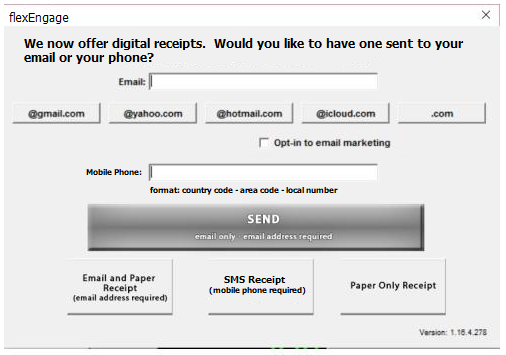
}When a customer is offered a digital receipt, a dialog box (such as the example below) should be presented at the POS to collect their mobile phone number and receipt option. For entering the mobile phone number, add support to enter the country code, area code, and local number.